

About This App
- Name Hub Video Downloader
- Category Tools
- Price 0
- Safety 100% Safe
- Developer SolidDevsKit
- Version 4.12.5
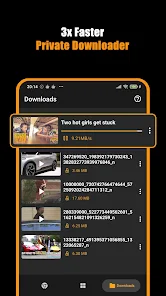
Description
Save Hub: All Video Downloader Browser – Download Videos Fast & Keep it Private!
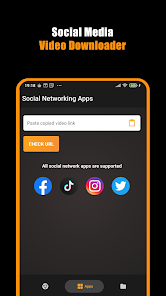
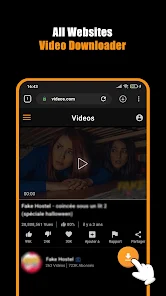
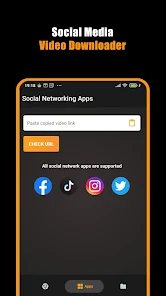
Want to save videos, movies, and files to your device without sharing your data? The Save Hub: All Video Downloader Browser has you covered. Its smart built-in browser and cutting-edge tools let you pull web content onto your device in total lack of prying eyes. Getting your hands on HD videos or using the Private Downloader App you trust has never been simpler or faster.The HD Downloader From Websites app runs super smoothly and lets you pause, resume, or keep downloads going in the background. That means your favorite movies and videos are one single tap away, whenever you want them.
📄 Why You’ll Love Save Hub: All Video Downloader Browser:📄
📥 Automatically spot and grab videos the moment you visit a site;
📥 Browse with a Private Downloader App that offers unlimited tabs;
📥 Enjoy unlimited downloading with the built-in Movie Downloader: All Video Saver;
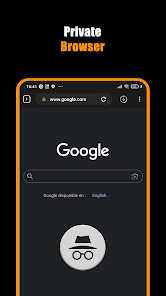
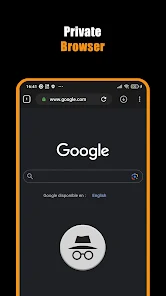
📥 Surf the web in the built-in Private Browser for better security;
📥 Experience lightning-fast downloads with the Download Hub tool;
📥 Save HD videos in 2K and 4K directly from websites;
📥 Keep downloads running in the background with pause, resume, and cancel at your fingertips;
📥 Automatically store videos straight to your gallery for super-easy access.
Your All-in-One Instant Download Solution!
With Save Hub: All Video Downloader Browser, multitasking your downloads is a breeze. This handy tool kicks multiple files into gear, so you save time. The built-in Download Hub Tool keeps everything flowing, even with movies that want to drag. Get Download Videos: Private Browser Downloader to snag the highest video quality every single time, no exceptions.Your Private Playground:🔒
Don’t want prying eyes? The built-in private browser has you covered. Surf, stream, and save while it blocks pesky sites. All your downloads and searches vanish the moment you close the app. Bookmark must-see sites so they're a one-click-job later, and use Download Videos: Private Browser Downloader to re-open them at a blink.
Quick Downloads, No Hassles:🎬
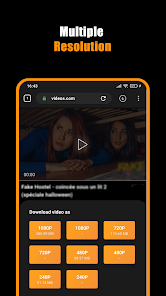
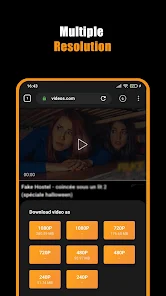
From a 30-second clip to the latest blockbuster, Movie Downloader: All Video Saver gets it done fast. Press play, hit download, and pick the quality that fits your screen. The HD Downloader From Websites setting makes every frame pop, so your movies look theatre-fresh.
Ultimate Download Control:⚡
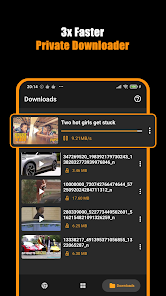
Juggling several downloads at the same time? The Download Videos: Private Browser Downloader lets you pause, resume, or stop files anytime you want. Thanks to Save Hub: All Video Downloader Browser, everything lands in your gallery neat and tidy, ready to binge in seconds.
Quick Steps to Begin:📲
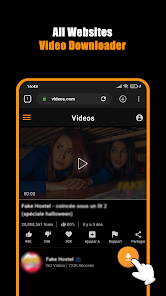
1. Open the private browser;
2. Play the video you want;
3. Tap the download icon;
4. Pick the quality you need and let the Movie Downloader: All Video Saver handle it.
Start Downloading With Confidence Today!
Seize control over your videos using Save Hub: All Video Downloader Browser. Looking for a private downloader app? Want a full Movie Downloader: All Video Saver? Need a HD Downloader From Websites? This app ticks every box. Enjoy speedy downloads, strict privacy, and the dependable Download Hub Tool. With it, your favorite videos will always be right where you want them.Disclaimer: The download of copyrighted materials is prohibited and regulated by the laws of your country. This app does not support Youtube downloads due to Play Store policy. Unauthorized reposting or downloading of content and/or violations of intellectual property rights is the sole responsibility of the user. Please get permission from the owner before you repost videos.
Frequently asked questions
If you're an Android user and don't download the app from the official Google Play Store, you may find the installation process more complicated than usual.
We fully understand your concern about safety. We agree that one person wouldn't be too careful in the cyber world. Meanwhile, we are happy to tell you that one of our priorities is to provide our users with safe app files that they can use without any worries.
We guarantee that all the app files we provide originate from official and reliable sources. We promise that they do not contain any malware that will harm your hardware or the safety of your privacy.
We are happy to inform you that the answer is an absolute YES! All the apps on our website are 100% free to download. Besides, you do not have to create an account. Just click on the download button, and it's done.
Recently we received a lot of emails from our users saying they couldn't log in for different reasons, such as "forgot the user name or password" or "had a new phone." We are willing to help you out. Please read the notes below to see what we can do.
To answer this question, please first let us know which account you're referring to.
If you're referring to your account of some app, like your Facebook account or your Youtube account, unfortunately we would not be able to help in this case. We would suggest you turn to the customer service of this application.
This question is essentially quite similar to the prior one. It's a pity that we are unable to help you cancel the subscription to a third-party application directly, while we would suggest you contact its customer service for further information.
Sorry that we are unable to help you get a refund from a third-party application directly. If you wish to get a refund from a third-party app, we would suggest you contact its customer service. We would be happy to provide you the way to contact them.
If you want a refund from us, we should apologize for your confusion. Our service is 100% free, and any payment information is not required.
If you run into any site that asks you to provide your payment information, be careful. Remember never to reveal your payment information to any unauthorized third parties, no matter how tempting their offer may seem.
Sorry that we cannot answer this question directly, as this section only aims to answer some general questions. You may find how to use a certain app by checking our review page.